
What Is a Modal in Web Design? A Complete Guide for Modern Websites
If you’ve spent any time browsing websites, you’ve almost certainly interacted with a modal, even if you didn’t know its name. Whether it’s a login form, a newsletter signup, a product quick view, or a confirmation message before deleting an item, modals have become a standard part of modern web design.
Understanding What Is a Modal in Web Design is important for business owners, designers, developers, and anyone planning to build a professional website. When used correctly, modals can improve user experience, increase conversions, and simplify website interactions. When overused or poorly designed, however, they can frustrate visitors and drive them away.
In this guide, we’ll explain what a modal is, how it works, its benefits, common use cases, best practices, and how businesses can use it effectively to create better digital experiences.
What Is a Modal in Web Design?
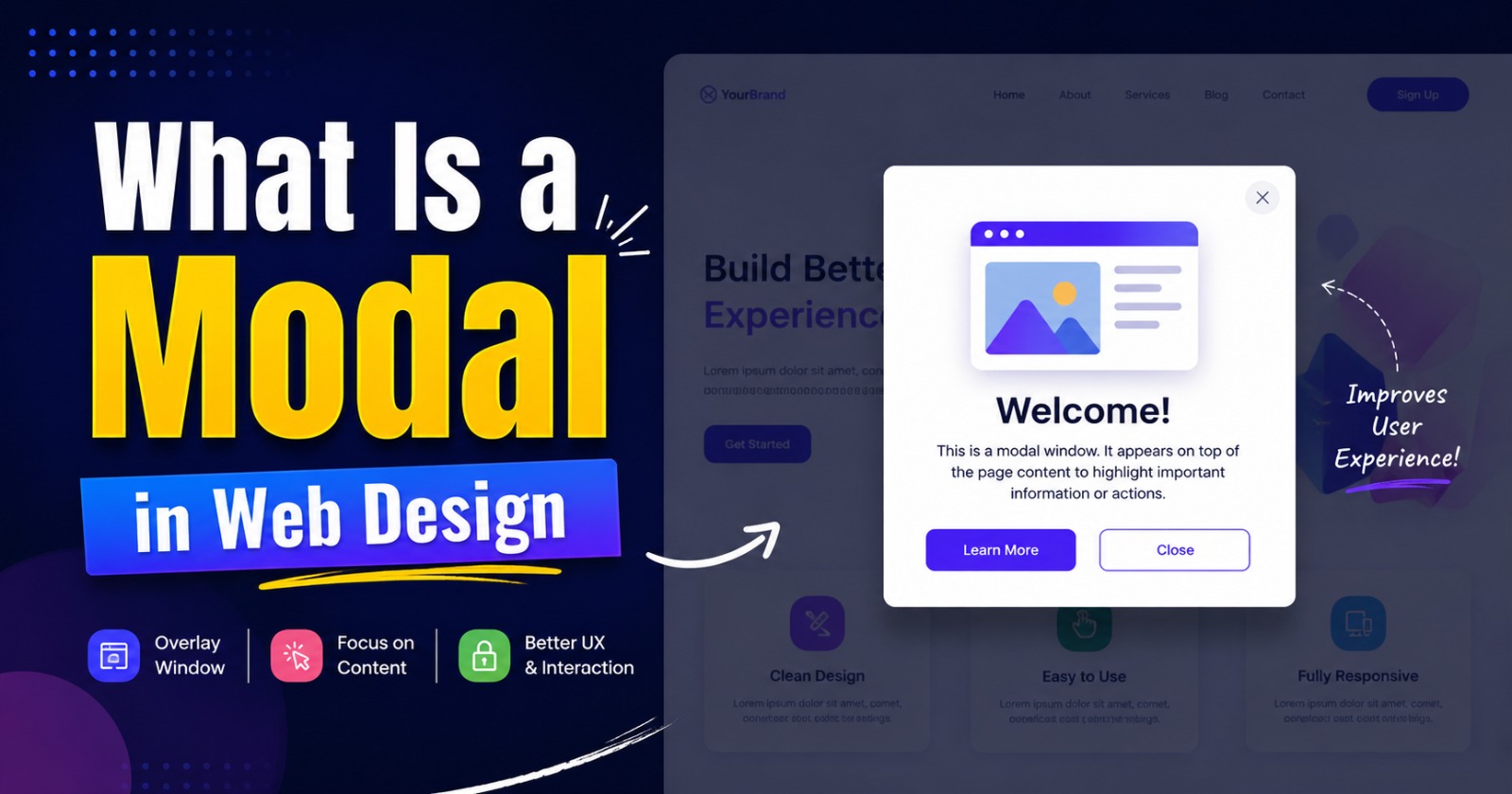
A modal is a graphical user interface (GUI) element that appears on top of a webpage to display important information or request user interaction. When a modal opens, it temporarily disables the rest of the webpage until the user closes the modal or completes the required action.
In simple terms, a modal is like a focused conversation between your website and your visitor. Instead of navigating to another page, users can complete a task without leaving their current location.
If you’ve ever clicked a “Sign In” button and seen a small window appear over the page, you’ve used a modal.
How Does a Modal Work?
A modal works by placing an overlay on top of the existing webpage. The background is usually dimmed to draw attention to the modal window.
Most modals include:
- A clear heading
- Informational text or form fields
- One or more action buttons
- A close (×) button
- A semi-transparent background overlay
Until the modal is dismissed or completed, users generally cannot interact with the content behind it. This focused interaction helps reduce distractions and encourages users to complete a specific action.
Common Examples of Modals
Modals appear across nearly every type of website. Some of the most common examples include:
Login and Registration Forms
Rather than redirecting users to another page, websites often display login and signup forms inside a modal.
Contact Forms
Businesses frequently use modals to let visitors request quotes or send inquiries without interrupting their browsing experience.
Newsletter Subscription
Many websites use modals to invite visitors to subscribe for updates, discounts, or exclusive content.
Product Quick View
E-commerce websites often display product details inside a modal, allowing shoppers to preview products without leaving the category page.
Confirmation Messages
Deleting files, removing products from a cart, or submitting important forms usually requires user confirmation through a modal.
Image and Video Galleries
Clicking an image often opens a larger version in a modal, allowing users to browse media without opening a new page.
Why Modals Are Important in Modern Web Design
A well-designed modal provides several advantages for both website owners and visitors.
Keeps Users Focused
Because the background becomes inactive, visitors naturally pay attention to the information inside the modal. This makes it ideal for important announcements, forms, or confirmations.
Improves User Experience
Instead of sending users through multiple pages, a modal allows them to complete tasks instantly. This creates a smoother and faster browsing experience.
Increases Conversions
Strategically placed modals can encourage visitors to:
- Subscribe to newsletters
- Download free resources
- Request quotations
- Register for events
- Complete purchases
- Claim limited-time offers
When used thoughtfully, modals often lead to higher engagement and better conversion rates.
Saves Development Time
Developers can reuse modal components throughout a website for various purposes, making interfaces more consistent and easier to maintain.
Types of Modals
Different situations call for different modal designs.
Informational Modals
These display announcements, notifications, or important messages.
Form Modals
Used for collecting user information such as contact details, login credentials, or appointment requests.
Confirmation Modals
Ask users to confirm potentially irreversible actions like deleting records or cancelling subscriptions.
Media Modals
Display images, videos, or galleries in a larger, distraction-free format.
Promotional Modals
Highlight special offers, discounts, product launches, or seasonal campaigns.
Best Practices for Designing Effective Modals
Simply adding a modal to your website isn’t enough. It should enhance the user experience rather than interrupt it.
Keep the Content Short
Visitors should immediately understand why the modal appeared. Avoid lengthy paragraphs or unnecessary information.
Use a Strong Call-to-Action
Buttons should clearly explain what happens next.
Examples include:
- Get Started
- Download Now
- Request a Quote
- Subscribe
- Continue
- Confirm Order
Make Closing Easy
Always include an obvious close button. Users appreciate having control over their browsing experience.
Optimize for Mobile Devices
A modal should display correctly on smartphones, tablets, laptops, and desktops. Responsive design ensures that buttons remain easy to tap and content remains readable.
Avoid Excessive Popups
Showing multiple modals within a short period can annoy visitors. Trigger them only when they provide genuine value.
Maintain Consistent Branding
Use your brand colors, typography, and design style so the modal feels like a natural part of your website.
Accessibility Considerations
Accessibility should never be overlooked.
An accessible modal should:
- Support keyboard navigation
- Allow closing with the Escape key
- Trap keyboard focus within the modal while it is open
- Return focus to the original element after closing
- Include descriptive headings
- Use proper ARIA attributes for screen readers
These practices make your website more usable for everyone.
Modal vs Popup
Although people often use the terms interchangeably, they are slightly different.
A modal requires user interaction before the rest of the webpage becomes available again. It temporarily blocks background activity.
A popup, on the other hand, may simply appear as a notification or promotional message without preventing users from continuing to browse the page.
Understanding this distinction helps designers choose the right interface element for different situations.
Common Mistakes to Avoid
Many websites misuse modals, reducing their effectiveness.
Some common mistakes include:
- Displaying modals immediately after page load
- Showing the same modal repeatedly
- Asking for too much information
- Making the close button difficult to find
- Using oversized images that slow loading
- Creating modals that don’t work properly on mobile devices
Avoiding these issues results in a more enjoyable browsing experience.
How Businesses Can Use Modals Effectively
Businesses across industries can use modals to improve customer engagement.
Examples include:
- Software companies offering free demos
- Educational institutions collecting admission inquiries
- Healthcare providers booking appointments
- Restaurants accepting table reservations
- Online stores displaying flash sales
- Service providers offering free consultations
The key is to present the right message at the right moment without interrupting the user’s journey.
Why Professional Website Design Matters
Creating effective modals requires more than attractive visuals. They must be fast, responsive, accessible, and strategically placed within the customer journey.
A professionally designed website ensures that every modal serves a clear purpose while maintaining excellent usability and performance. From custom forms and interactive product displays to conversion-focused call-to-actions, thoughtful implementation can make a significant difference in user engagement.
At The Blue IT, we specialize in designing modern, responsive, and user-friendly websites that combine beautiful interfaces with practical functionality. Whether you need a business website, eCommerce platform, educational portal, or custom web application, our experienced team builds websites that deliver exceptional user experiences and measurable business results.
Conclusion
Understanding What Is a Modal in Web Design helps businesses create websites that are both functional and engaging. A well-designed modal guides visitors toward important actions without forcing them to leave the current page, making interactions faster and more intuitive.
Whether it’s collecting leads, displaying product information, confirming user actions, or improving customer communication, modals have become an essential component of modern web design. When implemented with thoughtful design, accessibility, and user experience in mind, they can increase engagement, improve conversions, and contribute to a more polished, professional website.
If you’re planning to build or redesign your website, incorporating effective modal design is one of the many small improvements that can deliver a big impact on your users and your business.

Leave a Reply